Learn how Overwatch 2 players can easily update their gamer tags in 2025 with simple, affordable, and user-friendly name change procedures across platforms.
Many Overwatch 2 veterans find themselves staring at their outdated gamer tags years after creating their accounts. What seemed cool during their initial gaming days might now feel cringe-worthy or simply no longer represents their current gaming identity. The good news for players in 2025 is that Blizzard Entertainment has maintained its user-friendly approach to name changes, allowing gamers to refresh their online persona whenever inspiration strikes. The process remains remarkably straightforward, typically taking just a couple of minutes to complete regardless of platform.
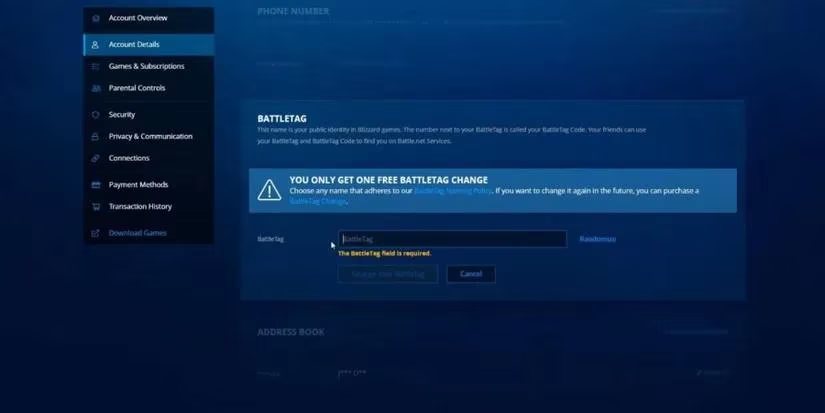
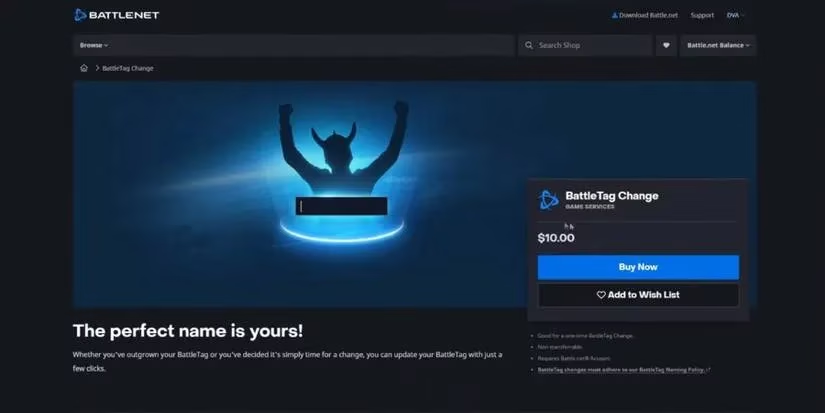
One crucial detail that hasn't changed since the early days of Overwatch 2 is the pricing structure for BattleTag modifications. Every player receives one free name change, perfect for those initial moments of realization that their childhood username needs an upgrade. However, subsequent changes come with a $10 fee through Blizzard's official store. This policy encourages players to put genuine thought into their new identity rather than treating name changes as frequent, impulsive decisions.
🔧 Platform-Specific Name Change Procedures
PC Players (Battle.net)
For computer gamers, the process begins within the Battle.net ecosystem:
-
Launch the Battle.net application and navigate to the store section
-
Log into your personal account using your credentials
-
Access "Account Details" followed by the "BattleTag" section
-
Locate the pencil icon labeled "Update" beside your current BattleTag
-
Enter your desired new name following Blizzard's naming policies
-
Finalize the change by selecting "Change Your BattleTag"
Console Gamers (PlayStation, Xbox, Switch)
Console players follow a slightly different path:
-
From the main dashboard, select the "Settings" option
-
Proceed to "Users and Accounts" and choose "Accounts"
-
Click on "Profile" and provide any required verification
-
Select "Edit" adjacent to your current GamerTag
-
Type your new preferred name and confirm your selection
Xbox-Specific Instructions
Xbox enthusiasts have their own streamlined method:
-
Press the Xbox button on your controller to open the guide
-
Navigate to "Profile and System" and select your Xbox profile
-
Choose "Customize Profile" from the available options
-
Click on your current GamerTag to access the change option
-
Input your new identity and confirm the modification
💡 Important Considerations for 2025
When selecting a new BattleTag, players should remember several key factors:
Naming Guidelines
-
No spaces allowed - BattleTags must be single words or combined phrases
-
Appropriate content - Avoid offensive, controversial, or trademarked names
-
Character limits - Keep names within Blizzard's specified length requirements
-
Originality matters - Duplicate names receive automatic numerical suffixes
Practical Considerations
| Aspect | Consideration | Impact |
|---|---|---|
| Recognition | Will friends easily identify you? | High |
| Pronunciation | Is it easy to say during voice chat? | Medium |
| Memorability | Will teammates remember your name? | High |
| Longevity | Will you still like this name in a year? | High |
Update Timing
After confirming a name change, players should exercise patience. The transformation isn't always instantaneous across all game systems. While the change typically appears immediately in some interfaces, it might take up to 24 hours to propagate through all of Overwatch 2's servers and display consistently to other players. This delay is normal and doesn't indicate any problem with the change process.
Cross-Platform Consistency in 2025
With Overwatch 2 maintaining its presence across PC, PlayStation, Xbox, and Nintendo Switch, the name change process demonstrates remarkable consistency. Whether you're battling on a high-end gaming rig or enjoying casual matches on your console, the fundamental principles remain identical. This uniformity ensures that players switching between platforms don't face additional complications when managing their gaming identity.
The ability to reinvent oneself periodically adds depth to the Overwatch 2 experience. It allows players to mark significant milestones in their gaming journey, whether celebrating improved skills, embracing new main heroes, or simply reflecting personal growth beyond the digital battlefield. As the game continues to evolve with new heroes, maps, and seasonal events through 2025, the freedom to refresh one's identity remains a valued feature within the community.
Ultimately, the name change process in Overwatch 2 represents more than just technical functionality—it's about self-expression in a dynamic gaming universe. Whether you're leaving behind an embarrassing childhood choice or simply seeking a fresh start, the straightforward procedure ensures that your external identity always matches your current gaming spirit. Just remember to choose wisely, as that second change will cost you a few Overwatch Coins!